Free Simple Business Books Workbook

You can see the money moving. You're still not sure what the business actually made.

You're checking the bank account, saving receipts, and maybe keeping a running spreadsheet.

Sales came in. Bills got paid. A credit card got used. You made a loan payment. Maybe you put money into the business or took some out.

At the end of the month, the cash balance changed — but that alone does not tell you what was a sale, an expense, a loan, an asset purchase, a credit-card payment, or owner money.

A clean-looking spreadsheet is not the same as complete or accurate books.

The Simple Business Books Workbook gives a very small business one structured place to enter opening balances and log up to 50 transactions using 20 fixed transaction types. From those entries, it builds a simplified monthly income statement, year-to-date summary, balance sheet, cash summary, and a set of warnings to review before you rely on the numbers.

Free Excel workbook. No account required. Anything you download is yours to keep.

Created by Josh Keller, CFO and business owner.

A common situationThe income statement looks reasonable. The balance sheet still does not balance.

You entered the month's activity and the workbook produced the reports. At first glance, they look finished. Then the balance check tells you something is still wrong.

Income statementCalculated
Ending cashCalculated
Balance-sheet checkNot zero
Review WarningsReview
Next stepFind the missing or inconsistent entry, or ask your bookkeeper or accountant for help before relying on the statements

That is what this check is there for.

The workbook does not force the balance sheet to work by plugging a number into owner equity.

It shows the balance check as-is so an unresolved problem stays visible.

If the check is not zero — or another warning still says Review — there is something to resolve before you rely on the reports.

Fictional illustrative example.

When this helps

Useful when the business is still simple enough to keep the books manually — but too active to keep figuring everything out from the bank balance.

You are using bank history, receipts, and your own spreadsheet

You have the information, but it is scattered across places and the spreadsheet logic changes depending on what happened that month.

Use one consistent transaction structure instead of rebuilding the process every time.

You know what was paid but are not always sure what kind of transaction it was

A loan principal payment is different from loan interest. A credit-card purchase is different from paying the credit-card bill. An owner draw is different from an operating expense.

Use the fixed transaction types to keep those differences visible.

You want more than a running list of money in and money out

A transaction list alone does not show profit, financial position, and cash movement as separate things.

Use the same entries to review all three instead of treating them as if they mean the same thing.

You want the records organized before involving a bookkeeper or accountant

It is easier to ask for help when you can point to the opening balance, transaction, warning, or report that does not look right.

Use the workbook to identify what is entered, what still looks wrong, and what needs another set of eyes.

What you get

One transaction list that feeds the reports you actually want to see.

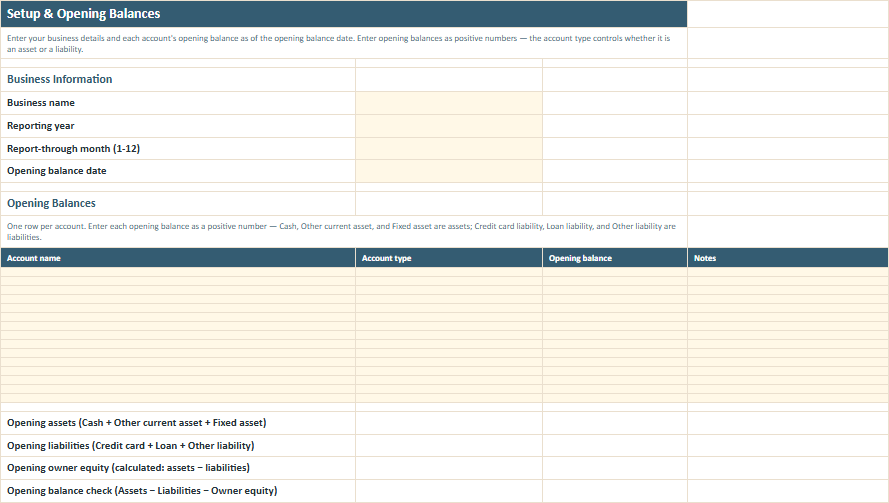
Start by entering the business name, reporting year, report-through month, opening-balance date, and up to 15 opening accounts.

Then record up to 50 transactions on one Transactions sheet.

Instead of designing your own accounting logic, choose from 20 fixed transaction types covering common activity such as:

  • sales receipts
  • direct costs and overhead expenses
  • business taxes or licence payments
  • owner contributions and owner draws
  • loan proceeds, principal payments, and interest
  • credit-card purchases and credit-card payments
  • asset purchases
  • other asset and liability movements
  • temporary uncategorized cash in and cash out

Each transaction also has room for a description, detail category, account name, amount, counterparty or source, reference, and notes.

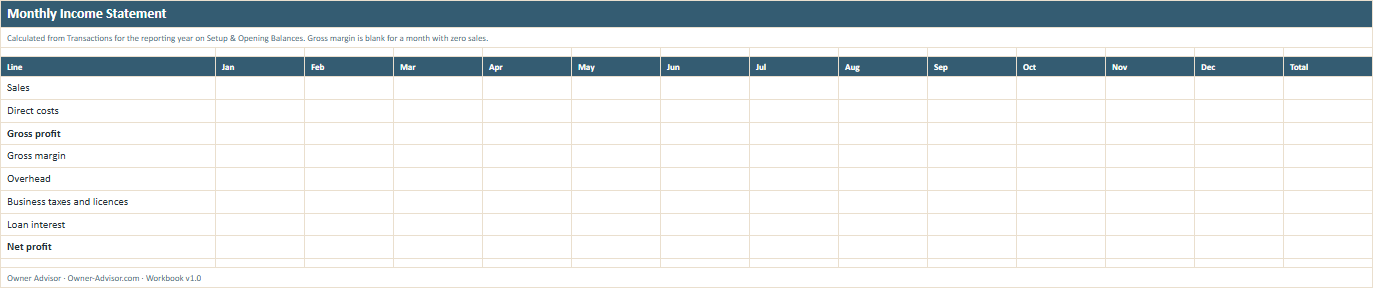
Monthly Income StatementSee sales, direct costs, gross profit, gross margin, overhead, business taxes or licences, loan interest, and net profit by month.
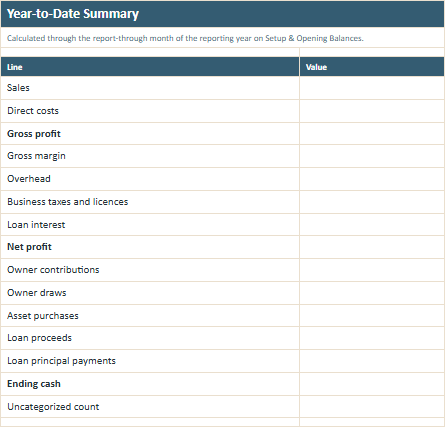
Year-to-Date SummarySee operating results alongside owner contributions and draws, asset purchases, borrowing and principal payments, ending cash, and unresolved uncategorized activity.
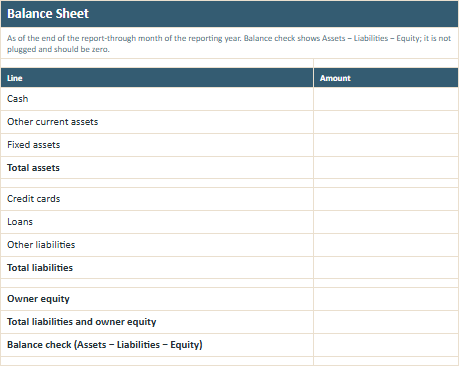
Balance SheetSee cash, other current assets, fixed assets, credit cards, loans, other liabilities, owner equity, and the balance check.
Cash SummarySee opening cash, cash received, cash paid, net cash movement, and ending cash across the year.
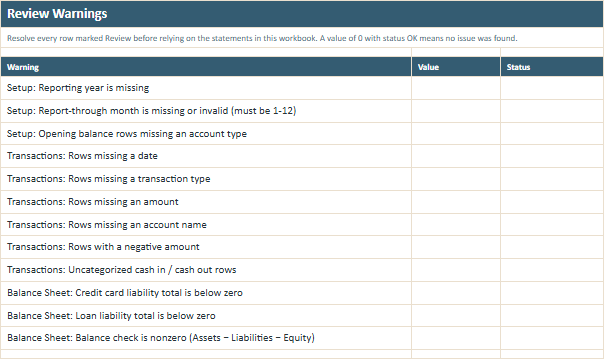
Review WarningsSee which obvious setup or transaction problems still need attention before you rely on the reports.

What it does — and doesn't do

A simple management workbook is useful because it stays simple. This workbook is designed for a very small business with a manageable number of transactions that is still keeping its books manually. It gives the owner a consistent way to record common cash-basis activity and produce a simplified management view without having to build the spreadsheet formulas from scratch. It does not connect to your bank, import or automatically categorize transactions, reconcile bank accounts, run payroll, calculate depreciation schedules, calculate sales or payroll taxes, prepare tax returns, maintain a full double-entry general ledger, or replace professional bookkeeping. If you already use proper accounting software, keep that system as the source for your books. The Simple Business Books Workbook is not meant to recreate books you already maintain somewhere else.

Get the free workbookFree Excel download. No account required. Join the Monthly Owner Guide to receive this workbook.

Before you put information in the file

Record what happened. Don't put sensitive account information into the workbook.

Enter account names, categories, dates, amounts, counterparties, references, and short notes.

Do not enter bank-account numbers, card numbers, Social Security numbers, employer identification numbers, passwords, credentials, or other sensitive identifiers.

The workbook should help organize the financial activity without becoming another place where sensitive financial information has to be protected.

See what's inside

Enter the activity once, then review what the workbook builds from it.

The file has eight sheets.

Transactions worksheet preview from the Owner Advisor Simple Business Books Workbook
Transactions

Keep the month's activity in one consistent list.

Enter the date, what happened, the transaction type, category, account, amount, counterparty or source, reference, and any short note you need later.

Enter amounts as positive numbers. The transaction type tells the workbook how the entry should affect the reports.

Setup and Opening Balances worksheet preview from the Owner Advisor Simple Business Books Workbook
Setup & Opening BalancesStart with the cash, assets, and debts the business already has.

Set the reporting period and enter the opening balances for the accounts you are bringing into the workbook. The workbook calculates opening owner equity from those assets and liabilities and shows an opening balance check.

Monthly Income Statement worksheet preview from the Owner Advisor Simple Business Books Workbook
Monthly Income StatementSee what the operating activity produced each month.

Review sales, direct costs, gross profit and margin, overhead, business taxes or licences, loan interest, and net profit across the year.

Year-to-Date Summary worksheet preview from the Owner Advisor Simple Business Books Workbook
Year-to-Date SummarySee the operating results alongside the other money movements affecting the business.

Review profit together with owner contributions and draws, asset purchases, borrowing, principal payments, ending cash, and uncategorized activity.

Balance Sheet worksheet preview from the Owner Advisor Simple Business Books Workbook
Balance SheetSee what the business has, what it owes, and whether the simplified balance sheet balances.

Review cash and other assets against credit cards, loans, other liabilities, and owner equity. If the balance check is not zero, the workbook leaves the problem visible.

Cash Summary worksheet preview from the Owner Advisor Simple Business Books Workbook
Cash SummarySee how the cash changed without treating cash movement as profit.

Review opening cash, money received, money paid, net cash movement, and ending cash month by month.

Review Warnings worksheet preview from the Owner Advisor Simple Business Books Workbook
Review WarningsSee what still needs attention before you trust the reports.

The workbook checks for several common setup and transaction problems, uncategorized activity, unusual liability balances, and a nonzero balance-sheet check.

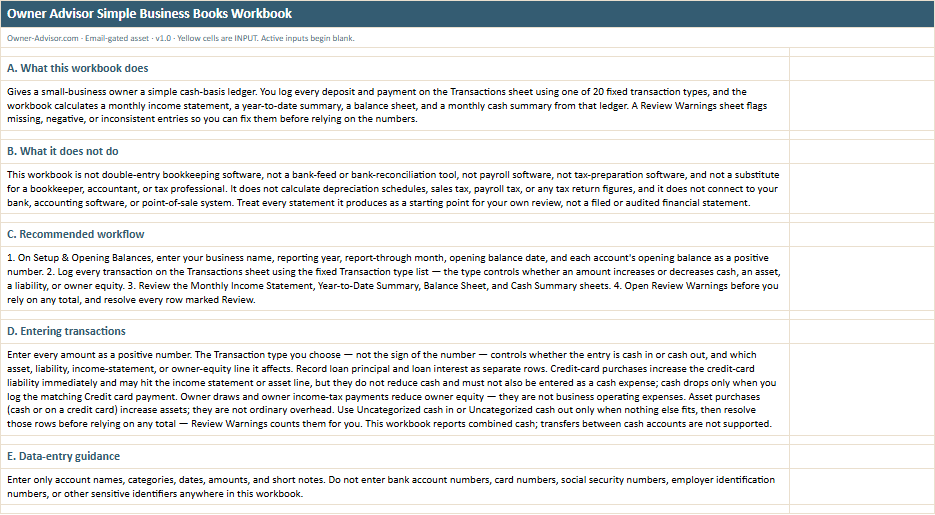
Read Me worksheet preview from the Owner Advisor Simple Business Books Workbook
Read MeUnderstand the few rules that make the workbook work.

Know what the fixed transaction types do, what should and should not go into the file, when a warning needs attention, and when it is time to ask a bookkeeper or accountant for help.

All names, amounts, dates, businesses, and scenarios shown in the previews are illustrative.

Start with the opening balances, then keep one transaction list

The workbook only works if the ledger stays complete.

The goal is not to create accounting software in Excel. It is to give a very small business a disciplined starting point for simple books — and make it easier to see when something still needs attention.

  1. 1

    Set up the reporting period and opening balances.
    Enter the basic reporting information and the accounts the business already has.

  2. 2

    Record each transaction once.
    Choose the transaction type that best describes what happened and enter the amount as a positive number.

  3. 3

    Review the statements.
    Look at the income statement, year-to-date summary, balance sheet, and cash summary together.

  4. 4

    Finish with Review Warnings.
    Resolve incomplete, uncategorized, negative, or inconsistent entries before relying on the reports.

Workbook details

Built to be useful without turning the decision into a bigger project.

FormatExcel .xlsx
SheetsRead Me, setup and opening balances, transactions, monthly income statement, year-to-date summary, balance sheet, cash summary, and review warnings worksheets
UpdatedAugust 2026
Created byJosh Keller, CFO

Related Business Guides

Once you have the reports, the next question is what they are telling you.

The workbook helps organize the numbers. These guides help you use them in a business review.

Related Business GuideRead the monthly financial reports guide

See how financial performance, financial position, cash, obligations, and other business measures fit together instead of reviewing one report in isolation.

Related Business GuideRead the profit and loss guide

Understand revenue, direct costs, gross profit, overhead, and operating results — and what changes deserve attention.

Related Business GuideRead the balance sheet guide

Understand what the business has, what it owes, and what its financial position looks like at a specific point in time.

Related Business GuideRead the cash-flow guide

Understand why profit and available cash can move differently and what can create cash pressure even when sales are healthy.

Common questions

Is this a replacement for QuickBooks, Xero, or a bookkeeper?

No. It is a simplified manual ledger for a very small business with a manageable transaction volume. It is not full accounting software and does not replace professional bookkeeping or accounting review.

If Review Warnings is clear, does that mean my books are correct?

No. It only means those particular automated checks did not identify one of the problems they are designed to flag. It does not mean the books are complete, reconciled, professionally approved, tax-correct, generally accepted accounting principles compliant, or audit ready.

How many transactions can I enter?

The workbook has 50 transaction rows. If the business regularly needs more than that, a manual workbook may no longer be the right primary bookkeeping system.

Can I connect it to my bank or credit card?

No. There are no bank feeds, transaction imports, automatic categorization, or bank-reconciliation features. You enter the transactions yourself.

Can I create my own transaction types?

No. The 20 fixed types are part of how the workbook knows what each entry should affect. You can use Detail category and Notes when you need more description.

What if I do not know how to classify a transaction?

Use Uncategorized cash in or Uncategorized cash out temporarily if nothing else fits. Then resolve that entry before relying on the reports. Review Warnings keeps count of uncategorized rows.

Does the workbook prepare my taxes?

No. It does not calculate tax-return figures, depreciation schedules, sales tax, payroll tax, or other tax filings. Confirm tax treatment with your accountant or tax professional.

What if I already use accounting software?

Keep using it as the source for the books. If you already have proper financial statements, the Monthly Financial Review Workbook is the better Owner Advisor tool for reviewing those reports rather than rebuilding them in another spreadsheet.

Turn the month's transactions into something you can actually review.

Simplified management-use financial statements only; not double-entry bookkeeping, payroll, or tax software, and not a substitute for a bookkeeper or accountant.

Know what money came in.

Know what money went out.

Know whether a transaction affected your profit, your cash, or something else entirely.

Know which entries still need attention before you rely on the reports.

Enter your email and we'll send you the workbook. Anything you download is yours to keep.