

Different people are using AI for different work
Put current and proposed uses into one register instead of relying on everyone to remember what they are doing.
Free Responsible AI Use Register
AI can start with a few simple shortcuts: drafting an email, summarizing notes, organizing information, or preparing marketing copy. Then it can move into customer communication, pricing, financial analysis, hiring, contracts, or automated actions before anyone has decided what the rules should be.
The goal is not to ban AI. It is to know where it is being used, what needs checking, and who stays responsible.
The Responsible AI Use Register gives you one place to inventory up to 25 current or proposed AI uses, classify them as Assist, Verify, or Decide, record what information and business decisions they touch, define human review, and track incidents and follow-up actions.
Free Excel register. No account required. Anything you download is yours to keep.
Created by Josh Keller, CFO and business owner, for owner-led businesses.
AI can help produce the draft. A person still needs to check the facts, customer-specific details, promises being made, and whether the message is appropriate before it goes out.
Fictional illustrative example.
When this helps
Put current and proposed uses into one register instead of relying on everyone to remember what they are doing.
Separate work AI can assist with from work that needs verification or a qualified person making the final decision.
Record the type of information involved and the controls that still need review without putting the sensitive source records themselves into the workbook.
Record an inaccurate output, confidentiality issue, customer complaint, missed human review, unexpected automated action, vendor change, or another exception and assign what needs to happen next.
What you get
The main register gives you space for up to 25 AI uses.
For each one, you can record the task, tool or vendor, internal owner, lifecycle, audience, Assist / Verify / Decide classification, information sensitivity, business impact, automation level, human-review requirement, reviewer, what must be checked, vendor and account questions, owner decision, restrictions, and future review dates.
The workbook also gives you separate places to record incidents and exceptions and turn unresolved safeguards or questions into owned follow-up actions.
See what's inside
The file has five sheets.

See the current and proposed AI uses in one place.
Record each use separately so you can see what AI is doing, who owns it, what information or decisions it touches, what human review is required, and what restrictions or follow-up remain.
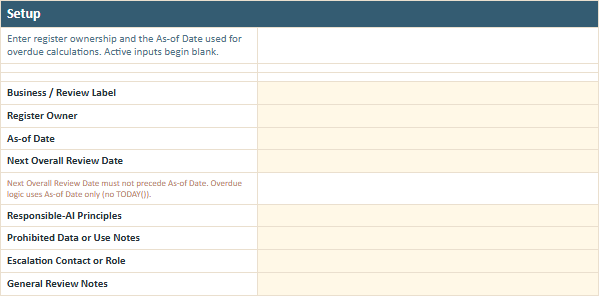
Set the register owner, review dates, operating principles, prohibited-use notes, escalation contact, and other basic expectations so responsibility does not disappear after the spreadsheet is created.
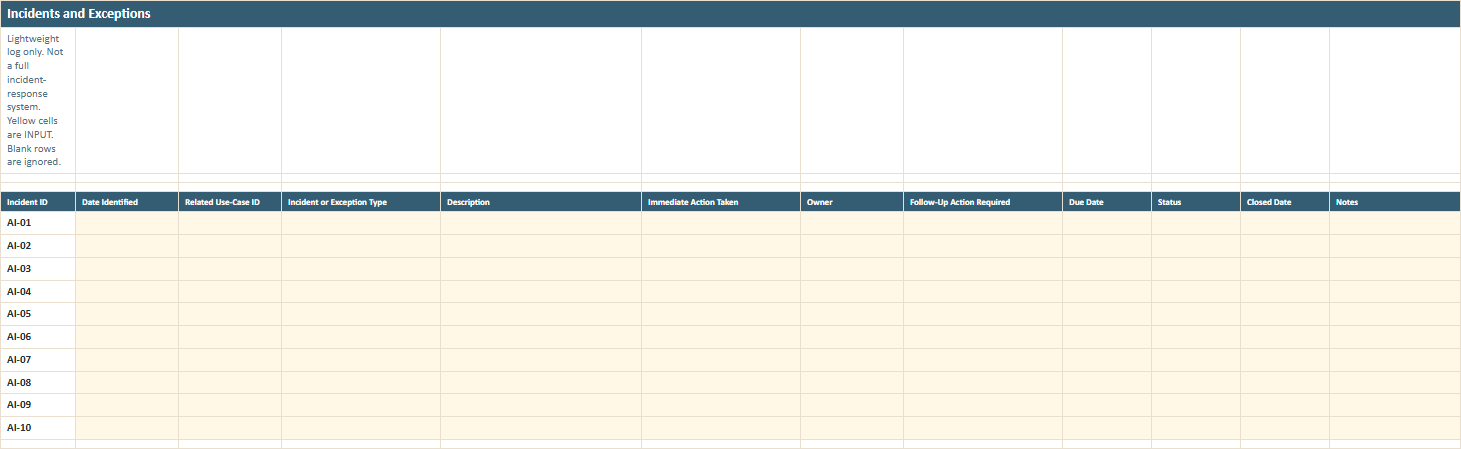
Record what happened, the immediate response, who owns the follow-up, what still needs to be done, and whether the issue has actually been closed.
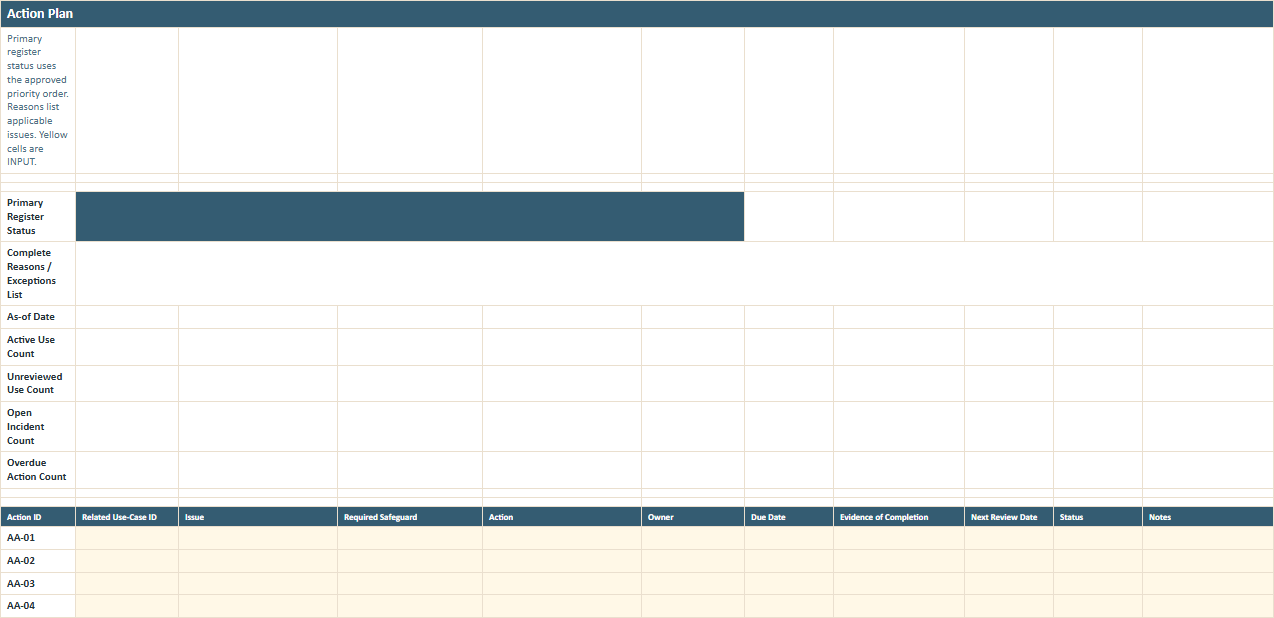
Track safeguards and follow-up actions with an owner, due date, evidence of completion, next review date, and status so important controls do not remain as notes nobody acts on.
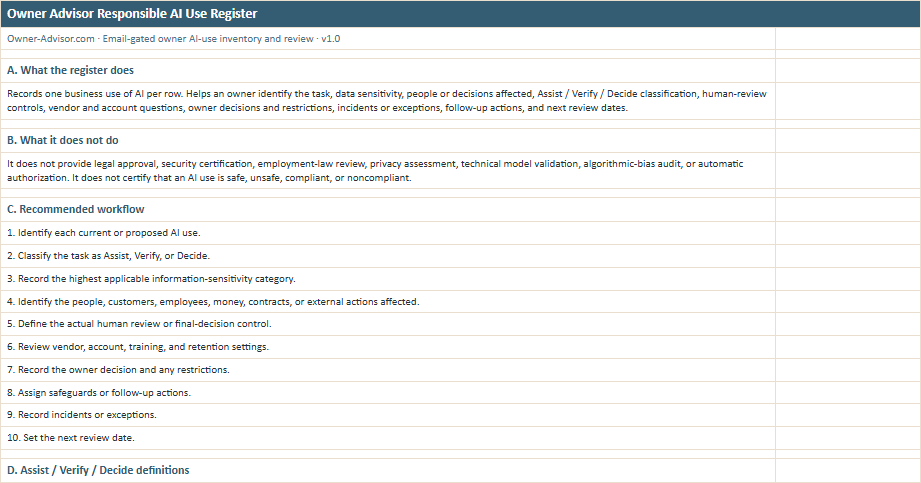
Use the definitions, ten-step workflow, worked examples, and professional boundaries to apply the register consistently instead of making up a different rule for every AI tool.
All names, amounts, dates, businesses, and scenarios shown in the previews are illustrative.
Start with the AI people are already using
The goal is not more AI paperwork. It is knowing who is responsible before an AI shortcut becomes a business decision.
List the current and proposed uses.
Start with the actual tasks people are using AI for, not a list of AI vendors.
Classify each use.
Decide whether the task belongs in Assist, Verify, or Decide.
Record what it touches and who checks it.
Note the information involved, business impact, human reviewer, and what must be verified.
Make the owner decision and set the next review.
Record any restrictions, safeguards, follow-up actions, and when the use should be looked at again.
Register details
Responsible AI guidance
The Owner Advisor Responsible Use of AI guide explains why the level of human review should change with the work being done, the information involved, and the consequences of getting it wrong.
Use it when you want the plain-language reasoning behind Assist, Verify, and Decide and the boundaries that remain with people and qualified professionals.
No. It is a practical owner-oversight register. It does not certify that an AI use is compliant, secure, private, accurate, unbiased, or legally appropriate.
Assist means AI can help draft, organize, summarize, brainstorm, or support lower-impact work while a person remains responsible. Verify means a person needs to check important facts, calculations, sources, permissions, privacy, suitability, and context before the output is used. Decide means a qualified person must make and approve the final decision. AI should not independently make or execute that final decision.
No. The classification belongs to the use case or task, not permanently to the tool. The same tool may be used differently in different parts of the business.
Yes. The register supports Current, Proposed, Paused, and Retired uses.
No. Record categories and controls instead. Do not store passwords, credentials, access keys, customer or employee records, payment-card data, medical records, or other sensitive source contents in the register.
Examples include inaccurate output, confidential-information exposure, customer complaints, inappropriate or biased output, unauthorized AI use, missed human review, financial or contractual errors, unexpected automated actions, and vendor or access changes.
No. It helps the owner organize information, controls, decisions, and unresolved questions. It is not an automatic authorization engine.
The workbook lets you set an overall next-review date and individual next-review dates for specific uses. It does not prescribe one universal review interval for every business or every AI use.
Practical AI-use register only; not AI compliance certification, legal, privacy, security, or employment advice.
Know what the AI is doing.
Know what information and decisions it touches.
Know who checks the work.
Know what still needs action.
Enter your email and we'll send you the register. Anything you download is yours to keep.